Somebody just called your firm
about a car accident.
Nobody answers a law office at 3:12 AM — so that case signs with whoever answers first. A person at your firm approves everything.
- Reads voicemail, text, WhatsApp, email, and your web form
- Builds a structured case file automatically
- Checks conflicts and computes the filing deadline
- Drafts the reply — a human approves every send
Free for 14 days · your web intake form works in two minutes · we onboard you personally
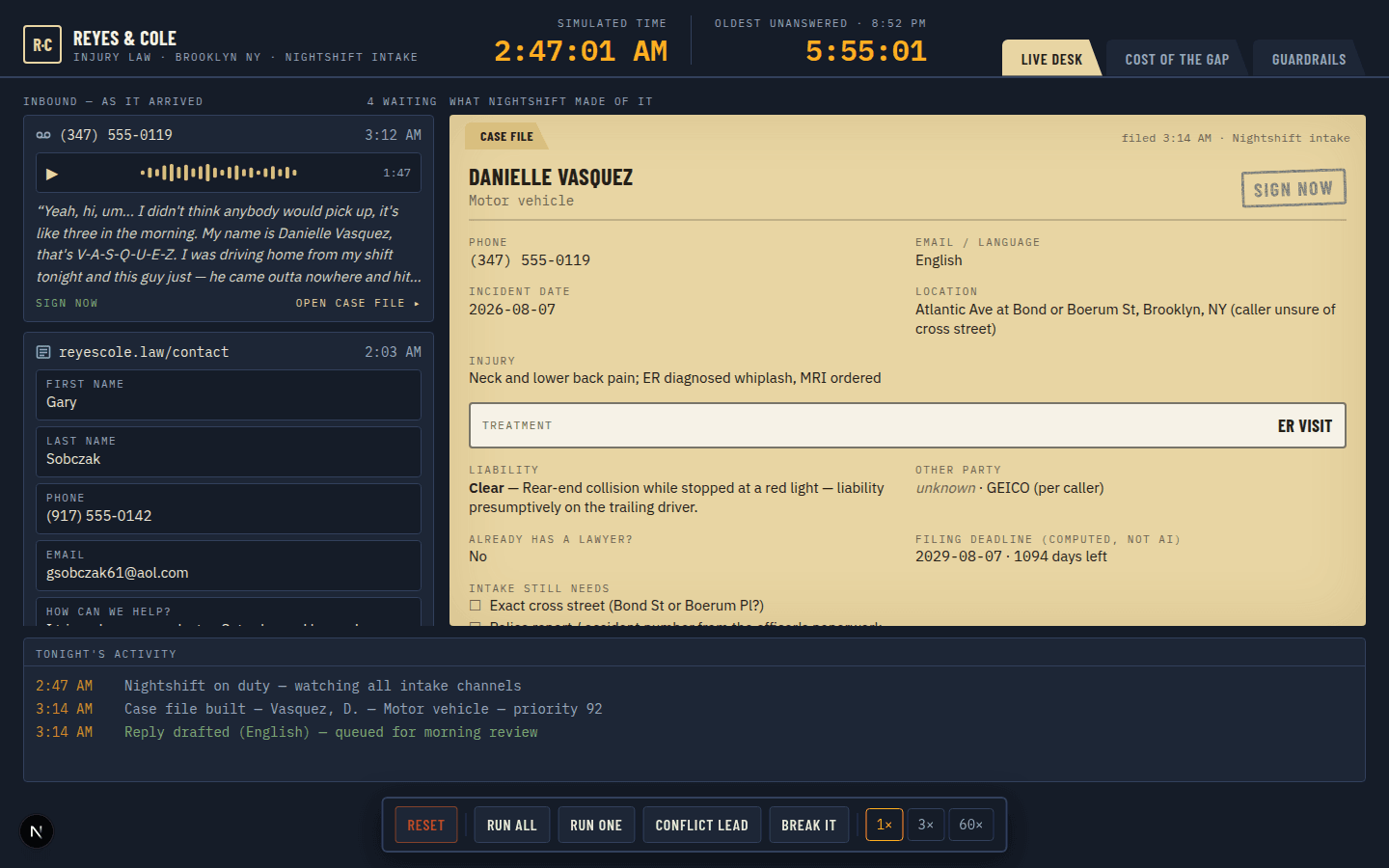
A voicemail at 2:47 AM, read into a case file with the deadline computed and a reply waiting for a person to approve.
The problem isn't getting leads. It's what happens after they arrive.
The call comes in at the worst time
Nobody's at the desk at 3 AM. The caller doesn't wait — they hang up and dial the next firm on the list.
Leads scatter across five channels
Voicemail, SMS, WhatsApp, email, the web form — each lands somewhere different, and stitching them together by hand is how good cases get missed.
Morning starts with cleanup, not casework
By the time someone opens the inbox, it's a pile of unsorted messages instead of a queue of qualified, prioritized cases.
The trust boundary is the product.
Reads the mess
A rambling voicemail, an ALL-CAPS text, a half-empty form, a WhatsApp in Spanish — each becomes a structured case file: injuries, treatment status, liability, priority score, and the exact questions intake still needs to ask.
Knows what it must never do
No legal advice. No case values. No implied attorney-client relationship. Filing deadlines come from a reviewed table and date math — never from the AI — and stay hidden until an attorney at your firm signs off on the table.
Your finger on Send
Every reply waits on your review screen, editable, with edits logged. Conflict matches are held for an admin. An append-only audit trail records who approved what, and when.
Every channel lands in one desk — voicemail, text, WhatsApp, email, the web form.
The raw message becomes a case file: injuries, treatment status, liability, priority score.
Checked against your conflict list and the reviewed deadline table — never guessed by the AI.
A person at your firm reviews the drafted reply, edits if needed, and clicks send.
The same desk, whether it's you or a growing team.
Solo practitioners
Capture every after-hours call without hiring overnight staff — the desk runs while you're in court or asleep.
Small firms
One shared inbox across the whole team, so a lead never sits unclaimed between attorneys or gets worked twice.
Growing firms
Add reviewers under Settings as you hire — every new person triages against the same conflict list and deadline table from day one, no retraining a receptionist.
Working in two minutes, wired in a week
Sign up
Your firm's intake form is live immediately — link it from your website and leads start flowing today.
We onboard you personally
On one call we load your conflict list, walk the deadline table with your attorney, and stand up a dedicated intake phone number.
Wake up to organized cases
Triaged, scored, conflict-checked, each with a drafted reply waiting for one click of human judgment.
Questions firms ask us first
Does Nightshift give legal advice?
No — by construction, not by promise. The system prompt forbids legal advice, case-value estimates, and any implied attorney-client relationship, and every reply carries a disclaimer appended by application code, in the sender's language.
Who decides the filing deadline?
Your attorney does. The deadline is computed from a reviewed statute-of-limitations table plus date arithmetic — never from the AI — and stays hidden from reviewers until an attorney at your firm reviews that table and acknowledges it in Settings.
Will this replace our intake staff?
No. Nightshift reads, sorts, scores, and drafts. A person at your firm reviews and approves every outbound reply before it sends — edits included and logged.
What happens if it can't figure out a message?
It's flagged "needs attention" with the raw message attached, so a person looks at it. Real leads never get a canned answer to paper over a failure.
What if a lead matches an existing client or an adverse party?
It's checked against your firm's conflict list automatically. A match holds the reply and requires an admin to release it — nothing goes out on a conflicted lead by accident.
What channels does it cover?
Voicemail, SMS, WhatsApp, email, and your web intake form — one desk, every channel, so nothing depends on which number or inbox a lead happened to use.
Wake up to organized cases, not a chaotic inbox.
Free for 14 days. Your intake form is live in two minutes — we handle the rest with you on a personal onboarding call.